


Google Alerts is one of the most powerful SEO tools that you’ll ever use. And it is FREE! Believe me; I’m not getting exaggerated.
Once you’re done reading this Google Alerts guide, you’ll understand its power. You can spy on your competitors, know what people are talking about you and your brand, discover new traffic techniques, and many other things I will explain below:
What Are Alerts?
Google Alerts are typically the emails sent to you when Google finds new results that match a pre-specified search term.
As an example, let’s say you set up an alert for the term “blog monetization.” From there on, whenever that phrase is mentioned, you’ll receive an email about it.
The results include web pages, videos, articles, newspaper stories, blog posts, Facebook posts, Reddit posts, video descriptions, or anything else published online and is indexed by the Google Search engine.
This way, you can keep up with the trends, news and also know what your competitors are doing.
How To Setup Google Alerts
Setting up Google Alerts is very easy and takes just a few seconds. First, sign in if you already have a Google account; if not, create a new Google account here.
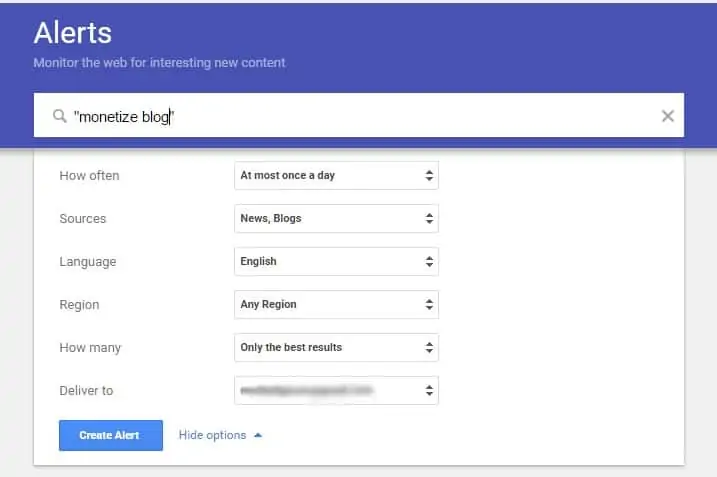
Understand the Google Alerts form:
- Search bar – In the Search Query box, enter the keyword/phrase you want to be alerted for.
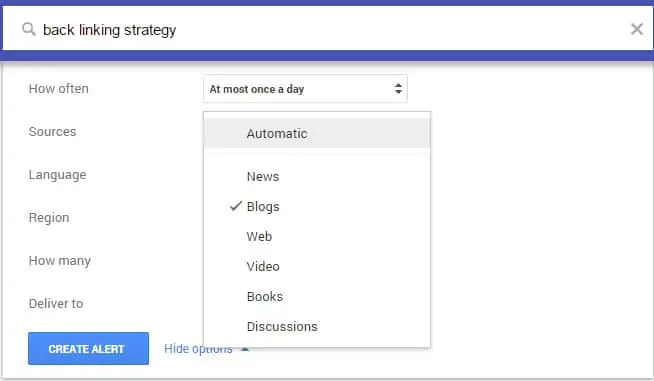
- Sources – In the Sources box, I always select to receive alerts for everything. But if you’re in a trendy niche like “internet marketing,” then you may want to select the type of information to be received from only “blogs” or “discussions” because if you select “automatic,” you’ll receive an email whenever Google indexes the specified term, anywhere.
- That’ll result in your Gmail inbox being flooded with Google Alert emails. However, it depends on the keywords/phrases you choose.
- How Often – You need to choose if you want to receive alerts “once a week,” “once a day,” or “as it happens.” I alter this based on the alert I set up. Meaning, I want to receive alerts about site security as it happens, but for the “spy on competitors” alert, I select once a day/ once a week.
- Language & Region – I usually leave these to ‘English’ and ‘Any Region.’ You can choose them according to your preferences.
- How many – In the How Many boxes, at all times, I choose “All Results” to make sure I don’t miss anything. I have created a separate email address for Google Alerts alone because I don’t want my primary email inbox to be bombarded with these emails. I suggest you do the same. But in case you want to use your primary email address for this purpose, go ahead.
At the end of this article, I’ll teach you a simple trick to avoid these emails clutter your inbox. After you have set everything up, you will get new alerts forever unless you edit or remove them. For more info on how to edit, delete or customize an existing alert – click here for more info from the Google support forum.
What can you do with Google Alerts?
Now, you might still be wondering how exactly these Google Alerts work to get you free high-quality traffic. Let’s dive into the different techniques of Google Alerts you can start using from today for high-quality traffic and social branding.

1. Spy on your Competitors
Successful and strategic businesses always keep an eye on their competitors. If you’re unaware of their actions or the direction they’re headed in, it’ll be highly impossible to beat them.
You can use Google Alerts to know what your competition is doing:
- What feedback do they receive (both positive & negative)?
- How active are they in social media?
- Have they implemented a new marketing strategy?
- What new links have they acquired?
It would help if you focused on these things. So set up alerts like these: Ex: “your competitor’s name,” “your competitor’s brand name,” “competitor’s web address” This gives you a head’s up in case anything changes that you should be aware of.
I don’t suggest you copy your competitors. Instead, use this technique to know what they’re doing. Then come up with something much better to beat them.
2. How To Drive Massive Traffic By Commenting
Every internet marketer tells you this ‘drive traffic by blog commenting. But does anyone tell you how to be the first person to comment on a popular blog/video/Fb post or anything else? Why should I be the first one to comment?
It’s pretty straightforward.
The first comment with a link will receive a lot more clicks than the 25th (or later) comment with a link in it. Imagine the amount of traffic you can generate if you were the first to submit a comment with a link pointing to your website.
But how do you get there? Google Alerts is again the answer.
Use keywords such as the name of the website you want to comment on, keyword phrase you want to rank high for (like weight loss), name of the product, the niche it is in, the name of any competing products, or anything relevant. Add as many as you can think of.
Example Alerts: “weight loss” “www.fitwoman.com” Now play the waiting game. In just a few hours, you should start finding all kinds of content, i.e., articles, videos, news, blog posts, Facebook posts, etc., related to your alert keyword/phrase.
Now click on the links you receive inside the emails. It would help if you were looking for pages that allow you to leave comments.
The idea is to be the first person to leave a comment to stay at the top of the comment thread and be easily seen by others. Don’t just say, “Great site, dude. Visit my site www.sitename.com”.
Remember that leaving your link sends up a notification to the moderators/admin of the site.
If they think that your link points to a helpful resource or something related to their article, they will be more likely to leave it up. So when you leave a comment, make sure it’s related and sensible.
If you smartly do this, you can expect endless, high-quality targeted traffic to your site.
Make Use Of Footprints
This is an extension of Drive Traffic by Blog Commenting. By using specific footprints, you can find blogs in your niche in an intelligent way. There are a lot of platforms on the web that you can use to get traffic from.
Commenting on WordPress blogs is a great way to get traffic. WordPress plugins, such as KeywordLuv and CommentLuv, will let you leave keyword-based links (pointing to your site) in the body of your comment. This is much better than leaving comments on regular blogs.
But how do you use Google Alerts to find these opportunities automatically?
Here are the alerts you can use:
- [Your keyword phrase] +”CommentLuv “
-
[Your keyword phrase] + “Enter YourName@YourKeywords in the Name field to take advantage.”

The best thing is that these links are “Do-Follow” links. Meaning, you can get the SEO juice from those links. So this technique will be of great help for your link-building efforts.
That’s just an example of tracing the KeywordLuv and CommentLuv (WordPress plugins) for your target keyword/phrase. There is a wide range of platforms you can target this way. All you need to do is find a common footprint to set up a google alert.
3. Finding New Guest Post Opportunities
Guest posting is a great way to generate traffic and followers. Guest Blogging helps you build authority and leverage your brand, too. Most blogs that accept guest posts have a web page explaining to you their terms & conditions to submit a guest post.
You can Google for ‘guest blogging’ along with your niche to find them.
With Google search, there’s always a chance to miss out on a few good opportunities. Google Alerts helps you keep an eye on the entire range of those blogs and inform you about new guest posting opportunities in your niche.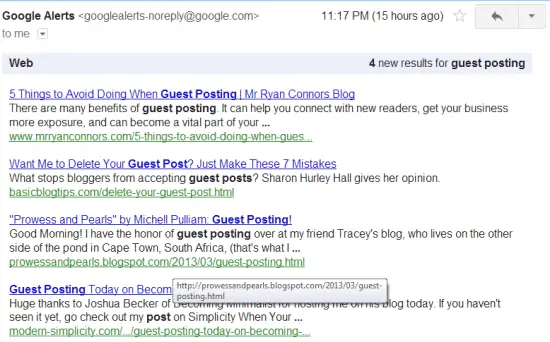
Example Alerts:
- “Write for us” [your niche]
- “Submit guest post” [your niche]
- “Bloggers wanted” [your niche]
- “Become a contributor” [your niche]
- “Become an author” [your niche]
4. Know what people are talking about you
I don’t think I need to tell you how important it is to know what other people think and talk about you. Set up an alert for yourself based on your own name/brand/website name. This way, you know precisely when someone mentions you/ your business/website, on forums, blogs, or anywhere.
You can also track who is sharing your content and which websites are pointing links to your site. Set up an alert for your name/brand as a keyword and then type “Discussions,” You get all the comments about you or your product on forums, blogs, etc. Example Alerts: “Your Name” “Your Brand Name” “www.yoursite.com” The best part is that it works as an excellent credibility and relationship builder. You can monitor both positive mentions and negative mentions about you.
Positive Mentions: If you find forums or blogs where your brand is being mentioned, you get the opportunity to join the conversation to boost your brand recognition.
Negative Mentions: Track the negative comments and try to respond calmly or apologize, if appropriate. For effective damage control, never ignore negative mentions.
5. Find Questions In Your Niche
This is a fantastic way to drive traffic, enhance your branding, and get loyal followers.
Set up an alert for questions related to your keywords/topic. Then hop in and provide an expert answer with a link back to your website. Example Alerts: How * weight loss Can * weight loss If you answer other’s questions regularly, you’ll soon become an authority in your niche.
Also, people will return your favor through word of mouth publicity, social shares, etc.
6. More ideas to put Google Alerts to work for you
Here are 12 more ideas on how to use Google Alerts to work for your or your business:
- Stay on top of news and development in your field.
- Discover new content and topics.
- Finding new jobs as soon as they are available.
- Find new and upcoming keywords.
- Find scrapers stealing your content.
- See how quickly Google is indexing your content.
- Discover relevant blogs and websites.
- Build your network within your niche.
- Find new social and bookmarking sites.
- Be the first to know when your keywords are in the news.
- Find new places to add backlinks for SEO.
- Determine which keywords are saturated with competition.
- Find backlinks to your site from content and article marketing.
How To Avoid Google Alerts Clutter Your Inbox:
By setting up a lot of Alerts, your inbox might get bombarded with those emails. You can easily avoid the clutter by setting a filter.
Just follow these steps:
- Log in to your Gmail account.
- Create a New Label and name it.
- Go to Settings > Filters > Create a New Filter.
- On the new page, add the following: From [email protected] To [your email id] Leave other fields blank.
- Click ‘Create filter with this search.
The filter is set up. So from there on, all the Google Alert’s emails will be stored under this label. Filters won’t clutter the inbox. Whenever you want to check the emails sent from Google Alerts, go to the label and check the emails.
There are no mobile google alerts app yet, but you can use it on any mobile internet browser without any problems.
Also, there is no official google alerts API, but you can purchase one created by the guys at coders11.com for only $18. If you want to stop or edit an alert, simply login to your Google alerts to account and make the necessary changes per your needs.
Now, take a step back and think about the unique ways you could use Google Alerts.
There are countless ways you could use them over and above what I have discussed in this chapter.
Think out of the box and be creative with your alerts! It is one of the most powerful tools at your disposal, so try to get the best out of it.

![How to Implement Schema To Improve Your SEO [Complete Guide]](https://competico.com/wp-content/uploads/2019/03/How-to-Implement-Schema-To-Improve-Your-SEO-Complete-Guide-200x111.png)
![What Kind of Backlinks Are the Best for SEO? [15 Types + Real Examples]](https://competico.com/wp-content/uploads/2021/09/The-Best-Backlinks-for-SEO-200x111.png)




Good way of telling, and fastidious paragraph to obtain data concerning my presentation focus, which i am going to present in university.
Nice article it has really helped me gain traffic thanks
Appreciate the recommendation. Will try it out.
Howdy this is kind of of off topic but I was wanting to know if blogs use WYSIWYG editors or if you have to manually code with HTML.
I’m starting a blog soon but have no coding skills so
I wanted to get guidance from someone with experience.
Any help would be greatly appreciated!
Pingback: 10 Ingredients For a Successful Business Blog [Complete Guide]